Saturday, July 31, 2021

Published July 31, 2021 by Anonymous with 0 comment

Sprinklr Interview Experience | On-Campus

A medical team wants to send a minimum number of workers for vaccinating people in the city, each worker can vaccinate people in an area whose radius is D, and can start from anywhere, an array is given which tells the location of people on X-axis, there is no one on Y-axis, help the medical team to know the minimum number of people needed to vaccinate the whole town.
Example : D - 2 , 
arr = {1,2,4,7,8,9,10,12,14,16,18,20}
Output : 4 
Explaination :- (1,2,4) , (7,8,9,10) , 
(12,14,16) , (18,20) , 
workers will be divided like this

(50 Marks) – O(N) solution accepted

(HINT: sort the array and take the group of people in a 2D distance at once)

  • Sprinklr users are seeing some duplicate documents on the platform and we need you to help to detect those documents and remove them. We already have a framework to detect if 2 documents are duplicates or not, what we need from you is how many unique documents are present given pairs of duplicate documents. We also want to query if 2 documents are similar or not
  • (75 Marks)

    Input Format :-
    N : total documents 
    OPS - total operations
    
    next ops line will contain 3 space 
    separate integers say(op , doc1 , doc2) 
    where the first integer (op) denotes 
    operation type and remaining 
    two are documents numbers
    
    op = 0 , means next 2 documents are similar
    
    OUTPUT :-
    Single integer in new line for every query , 
    0 if documents are not duplicate , 
    1 if documents are duplicateSingle 
    integer in new line for every query , 
    0 if documents are not duplicate , 
    1 if documents are duplicate
    EXAMPLE :-
    10                            
    5                            
    0 1 2                        
    0 5 7
    1 1 3
    0 2 3
    1 1 3
    OUTPUT :-
    0
    1
    7
    EXPLAINATION :-
    There are total of 10 documents
    Given 5 operations are :-
    1) Mark the document 1 & 2 duplicate
    2) Mark the document 5 & 7 duplicate
    3) Query if document 1 & 3 are duplicate , 
    hence the first line in output 0
    4) Mark the document 2 & 3 duplicate
    5) Query if document 1 & 3 are duplicate , 
    hence the second line in output 1
    Print total unique documents now
    (1,2,3) , (5,7) , (4) , (6) , (8) , 
    (9) , (10) = total 7 unique documents
    Hint :- 
    two ways through which this 
    problem can be solved
    1) using dfs traversal in each query , 
    similar to count total number 
    of connected components
    2) using disjoint set union method
Maximise the sum

you will be given N intervals, where i’th interval will start at time Li and will be finished at Ri and contains the special value Ki, You have to select P intervals such that no intervals overlap each other and maximize the sum of special values of the selected P intervals. (100 Marks)

Constraints
1<= N <= 10^5
1<= P <= 10^2
1<= N*P <= 10^6
1<= Li , Ri <= 10^9
1<=Ki <= 10^6
Example :-
consider N=3 and 
P=2 and the intervals are 
1 3 10
2 5 15
5 7 6
Here the answer is 16 , 
as taking 1st and 3rd intervals
will be optimal
Input Format :-
first line contains N and P
N lines follow 3 space separated 
integers Li , Ri , Ki
Sample Input 
3 2
1 3 10
2 5 15
5 7 6
Sample Output
16

HINT:

Try to think DP with Binary Search in every recursive stack

Adblock test (Why?)


Original page link

Best Cool Tech Gadgets

Top favorite technology gadgets
Read More
      edit

Friday, July 30, 2021

Published July 30, 2021 by Anonymous with 0 comment

What is Pegasus Spyware and How It Works?

No one can deny that in this digitally advanced era, the incidents of cyberattacks like hacking, data breaches, etc. are increasing exponentially. And in a similar context, recently a term has become very much popular worldwide – ‘Pegasus Spyware’.  

Pegasus-Spyware

If you don’t know about it yet then no worries as here in this article we’re going to know about every crucial aspect of this ‘Pegasus Spyware’ such as what is this, how it works, why it is being used, etc. But before knowing about the ‘Pegasus Spyware’, first, let’s understand what is Spyware? Spyware is some sort of malicious software that is usually installed in your computer or mobile device, even without your consent, to damage your system or steal sensitive data.

What is Pegasus Spyware?

The Pegasus Spyware, created by the Israeli cyber intelligence firm NSO Group, is also designed to hack the computers or mobile devices to gain access to the device and retrieve the data from it without the user’s consent and then deliver it to the third party who is actually spying on you. However, the parent organization of this Pegasus Spyware claims that it is intended to help government authorities to be used against terrorists and criminals by spying on them.  

Pegasus Spyware has first identified around 4-5 years ago when a human rights activist from the United Arab Emirates received a text message that was actually a phishing setup. He sent these messages to the security agency and it was found out that if he (the user) had opened those links – his phone would have been infected with the malware, named Pegasus.

Recently, a database of around 50,000 phone numbers that may have been targeted for surveillance using Pegasus, was leaked to several standard investigative media platforms. And most importantly, among these 50,000 contacts, the Pegasus Project (a general name given to this investigative report) found that there are hundreds of public officials contacts also. However, the availability of any number in this database doesn’t compulsorily mean that the respective device was successfully penetrated – and various cyber investigation mechanisms are currently going on for the same.

How Does It work?

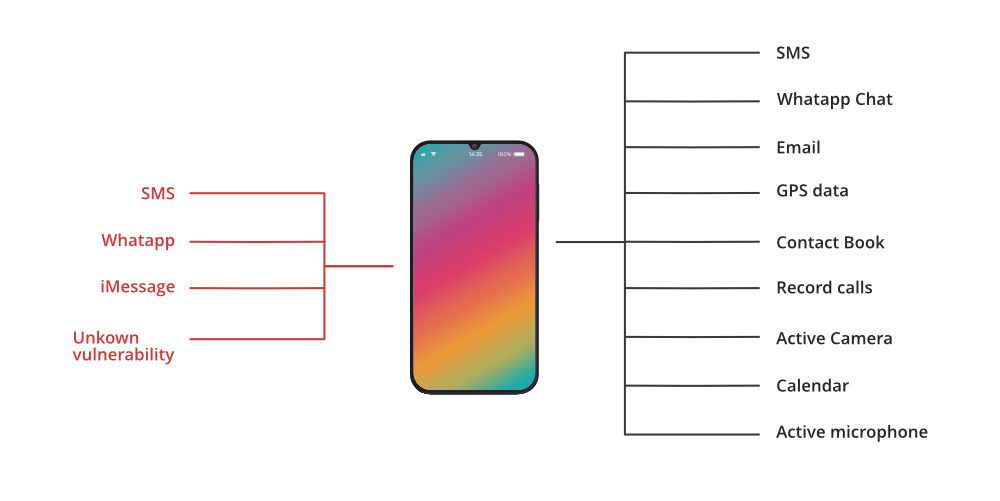
Let us tell you that this Pegasus Spyware attacks the devices so seamlessly that even the device owner might not have any idea about it. You can better understand this with a situation like even a WhatsApp missed call (yes, you heard it right….a missed call) can make the Pegasus Spyware hack your device. Other than that, based on various standard reports, it has been observed that Pegasus is using a variety of endpoints to attack the devices such as it is using iMessage to attack iPhones.  

The noticeable thing here is that it follows the zero-click method i.e, the device owner even isn’t required to click on the message, mail, link, etc. or to give any input to make the malware work. On top of that, if the user finds something suspicious and deletes the message – the spyware would still infect the device.  

And once the Pegasus gets into your smartphone, now your text messages & emails, contacts, photos, passwords, etc. can be accessed by the other party. In fact, the access is given to such an extent that even your device mic or camera can also be operated by the one who’s is spying on you very conveniently. The Pegasus Spyware can even access the end-to-end encrypted messages or files as it can now steal them before the encryption or after the decryption.

How-Pegasus-Spyware-Attacks

You also need to know that the company behind this Pegasus Spyware made Amazon’s AWS cloud infrastructure as a part of their system – however, now Amazon has deactivated all the accounts of the NSO group after the advent of recent investigation reports.  

Can this Pegasus Spyware affect our normal lives? – Okay, firstly we need to understand that as said by NSO Group, the intention behind the development of this ‘Pegasus Spyware’ is to help the government bodies by providing them the advanced technology to detect and prevent terrorism or criminal activities. Also, this spyware is quite expensive to use (as per the reports, it charges government bodies around USD 650,000 to spy on 10 iPhones or android smartphones with some additional charges like installation fee, annual maintenance, etc.) – hence, practically it won’t be feasible for the govt. agencies to use this tool without any solid or justified reason. So, you might consider yourself safe from this Pegasus Spyware due to these particular reasons.  

In fact, Apple has also issued a statement over this Pegasus Spyware matter“Attacks like the ones described are highly sophisticated, cost millions of dollars to develop, often have a short shelf life, and are used to target specific individuals” that is somehow true as well and again depicts that normal users do not need to worry much about it.  

But, what if in the future there comes spyware that is as strong (or even more than that) as this Pegasus Spyware and being quite affordable as well – then don’t you think it can be misused and impact normal people lives as well. Yes, that’s actually the point! Instead of just ignoring this Pegasus Spyware, we should be well-aware of this, understand its pros and cons to avoid such kinds of spyware or cyberattacks in the future. For instance, we can consider the below-mentioned points to prevent ourselves from these Spywares likes Pegasus, etc.  

  • One of the basic approaches is to keep the Operating System and other apps in the device updated.
  • Open only those links or messages on your device that are sent by recognized and trusted contacts.
  • You should avoid using public WiFi services such as at cafes, parks, etc.  
  • Always have a backup of the important data stored in your device.

Also, do remember that following the above-mentioned approaches will not make you completely safe from spyware like Pegasus and others – but yes, the more you’ll follow such strategies and preventive measures, the more your risk to get attacked by these Spywares will get reduce!!

Go Premium (An Ad Free Experience with many more features)

Adblock test (Why?)


Original page link

Best Cool Tech Gadgets

Top favorite technology gadgets
Read More
      edit
Published July 30, 2021 by Anonymous with 0 comment

Smallest length of number divisible by K formed by using D only

Given 2 integers D and K, the task is to find the minimum length of a number formed by repeating D that will be divisible by K. If no such number exists, print -1.

Examples:

Input : D = 1, K = 37
Output : 3
Explanation : The minimum number formed by repeating 1 that is divisible by 37 is 111

Input : D = 2, K = 36
Output : -1

Naive Approach : The idea is to keep forming the number until it becomes divisible by K or it exceeds the range. 
Time Complexity : O(10^18)
Auxiliary Space : O(1)

Efficient Approach : The idea is to store the remainders that are produced by dividing the number with K and storing the remainders in an array. And when the same remainder appears again, it can be concluded that no such number exists. Follow the steps below to solve the problem:


  • Initialize the variables cnt as 0 to store the answer and m to store the number.
  • Initialize the vector v[] of size K to store the remainders and set the value of v[m] as 1.
  • Iterate in a while loop and perform the following steps
    • If m is equal to 0, then return the value of cnt as the answer.
    • Set the value of m as (((m * (10 % k)) % k) + (d % k)) % k.
    • If v[m] is equal to 1, then return -1 as no such number is possible.
    • Set the value of v[m] as 1 and increase the value of cnt by 1.
  • After performing the above steps, return the value of -1.

Below is the implementation of the above approach:

C++

#include <bits/stdc++.h>

using namespace std;


int smallest(int k, int d)

{

    int cnt = 1;

    int m = d % k;


    vector<int> v(k, 0);

    v[m] = 1;


    while (1) {

        if (m == 0)

            return cnt;

        m = (((m * (10 % k)) % k) + (d % k)) % k;


        if (v[m] == 1)

            return -1;

        v[m] = 1;

        cnt++;

    }

    return -1;

}


int main()

{


    int d = 1;

    int k = 41;

    cout << smallest(k, d);

    return 0;

}

Time Complexity : O(K)
Auxiliary Space : O(K)

Attention reader! Don’t stop learning now. Get hold of all the important DSA concepts with the DSA Self Paced Course at a student-friendly price and become industry ready.  To complete your preparation from learning a language to DS Algo and many more,  please refer Complete Interview Preparation Course.

In case you wish to attend live classes with experts, please refer DSA Live Classes for Working Professionals and Competitive Programming Live for Students.


Adblock test (Why?)


Original page link

Best Cool Tech Gadgets

Top favorite technology gadgets

Read More
      edit

Thursday, July 29, 2021

Published July 29, 2021 by Anonymous with 0 comment

Count pairs from an array with absolute difference not less than the minimum element in the pair

Given an array arr[] consisting of N positive integers, the task is to find the number of pairs (arr[i], arr[j]) such that absolute difference between the two elements is at least equal to the minimum element in the pair.

Examples:

Input: arr[] = {1, 2, 2, 3}
Output: 3
Explanation:
Following are the pairs satisfying the given criteria:

  1. (arr[0], arr[1]): The absolute difference between the two is abs(1 – 2) = 1, which is at least the minimum of the two i.e., min(1. 2) = 1.
  2. (arr[0], arr[2]): The absolute difference between the two is abs(1 – 2) = 1, which is at least the minimum of the two i.e., min(1. 2) = 1.
  3. (arr[0], arr[3]): The absolute difference between the two is abs(1 – 2) = 1, which is at least the minimum of the two i.e., min(1. 2) = 1.

Therefore, the total count of such pairs is 3.

Input: arr[] = {2, 3, 6}
Output: 2


Naive Approach: The simple approach to solve the given problem is to generate all possible pairs from the array and count those pairs that satisfy the given conditions. After checking for all the pairs, print the total count obtained.

Time Complexity: O(N2)
Auxiliary Space: O(1)

Efficient Approach:  The above approach can also be optimized by sorting the given array and then  iterate two nested loops such that the first loop, iterate till N and the second loop, iterate from  arr[i] – (i%arr[i]) with the increment of j as j += arr[i] till N and count those pairs that satisfy the given conditions. Follow the steps below to solve the problem:

  • Initialize the variable, say count as 0 that stores the resultant count of pairs.
  • Iterate over the range [0, N] using the variable i and perform the following steps:
    • Iterate over the range [arr[i] – (i%arr[i]), N] using the variable j with the increment of j as j += arr[i] and if i is less than j and abs(arr[i] – arr[j]) is at least the minimum of arr[i] and arr[j] then increment the count by 1.
  • After performing the above steps, print the value of count as the result.

Below is the implementation of the above approach:

C++

#include <bits/stdc++.h>

using namespace std;


int getPairsCount(int arr[], int n)

{


    int count = 0;


    for (int i = 0; i < n; i++) {


        for (int j = arr[i] - (i % arr[i]);

             j < n; j += arr[i]) {


            if (i < j

                && abs(arr[i] - arr[j])

                       >= min(arr[i], arr[j])) {

                count++;

            }

        }

    }


    return count;

}


int main()

{

    int arr[] = { 1, 2, 2, 3 };

    int N = sizeof(arr) / sizeof(arr[0]);

    cout << getPairsCount(arr, N);


    return 0;

}

Time Complexity: O(N*log N)
Auxiliary Space: O(1)

Attention reader! Don’t stop learning now. Get hold of all the important DSA concepts with the DSA Self Paced Course at a student-friendly price and become industry ready.  To complete your preparation from learning a language to DS Algo and many more,  please refer Complete Interview Preparation Course.

In case you wish to attend live classes with experts, please refer DSA Live Classes for Working Professionals and Competitive Programming Live for Students.


Adblock test (Why?)


Original page link

Best Cool Tech Gadgets

Top favorite technology gadgets
Read More
      edit
Published July 29, 2021 by Anonymous with 0 comment

9 Features of Chrome Developer Tools That You Must Know

We all know the popularity of the Chrome browser. This browser has made life easier for developers and being a developer using its built-in developer tool is nothing new for you. The chrome developer tool has made debugging a lot easier. The built-in developer tool allows you to edit the page, debug it and also give them access to work on the internal web browser and application. 

9-Features-of-Chrome-Developer-Tools-That-You-Must-Know

This one boosts the productivity of the developers, and also it makes the easy diagnosis of the website. In this article, we are going to discuss the different features of Chrome DevTools. We will discuss, what are the purpose of different tabs and how it works. 

Accessing the developer tool is very easy. You can press Ctrl+Shift+C, or you can right-click on an element on the website and select Inspect from here. You will see a lot of panels or tabs in devTool. These tabs give you a lot of functionalities. Let’s discuss the features of DevTools one by one.

1. Easy Access on Desktop or Mobile

The second tab in the left corner is used to check your application view on mobile or desktop. It allows you to check how your application will look on different devices or different screen sizes. By default, you will see the desktop mode for your application. It is mainly used to check the responsiveness of your website. You will find different screen resolution options to check the responsiveness of your website.


2. Element Tab

This tab is mainly used to debug the code of HTML and CSS in your website. Whenever you need to change something in the styling of your HTML and CSS and you want to see how it will reflect in your website, you can do that with the help of this tab. Elements tab allows you to interact with the DOM, change it and view it. 

This section is mainly divided into two parts. The left panel displays the HTML elements. How the elements are embedded in the DOM tree. You can modify the changes in your CSS or HTML file once you see the changes in real-time using this tab. You can check which tag is doing what on your web page and their position on your screen. This tab helps you in taking a closer look at DOM structure and identifying the HTML elements rendered in it.

3. Console

This tab helps you in debugging the JavaScript code. You can view the logged message and run the JavaScript code here. This tab helps you in showing the error along with the line number in your source code. This property is really helpful in debugging the source code. 

Also, you can monitor the events, set the breakpoints, style output, count statements, or measure the execution or loading time as well. This tool will be used very often. 

4. Network

This tab is mainly used to detect the upload or download request made by a webpage. You can log all network activity in the Network log. You can open the network panel and then reload the webpage. In the Network log, you will see the resources are represented chronologically in each row. 

  • Status: HTTP response code.
  • Type: The resource type.
  • Initiator: What caused a resource to be requested.
  • Time: Time which is taken by the request. 
  • Waterfall: Different stages of request are represented graphically. 

You also have the option to check the layout of the page and how it behaves when some resources are not loaded in. 

5. Performance

As the name suggests, this tab is used to optimize the loading speed of your website. You can analyze the runtime performance of the web page. Capture setting allows you to capture the performance metrics settings. 

You can find the throttling dropdown list in the Network and CPU list. For CPU, you can select 2X slowdown. Your Devtools throttles your CPU to make it two times slower than normal. This will help you in checking the website performance on mobile devices. You will also find the record and reload button in this tab. The record button starts profiling the website’s various events during this period. After clicking on Stop, you will find the results and timings of each event.  


6. Memory Track Down Memory Leaks

This tab displays the profile memory usage, the page uses with the Chrome task manager. You can track down all the issues that affect the page performance, for example, memory leaks and bloats. Websites that consume more memory give bad experiences.

This tab provides profiling mainly in three different ways…

  • Heap Snapshot: This is used to take the heap snapshot that displays the distribution of memory among JavaScript Objects and DOM nodes.
  • Record Allocation Time: You can track down the memory leaks in a website JS heap.
  • Record Allocation Profiles: Displays the memory allocation from the JavaScript functions. You’re also allowed to record the profile with actions.

7. Application: Inspect Resources

This tab helps you in managing the resources such as cookies, local storage, application cache, fonts, stylesheets, images, registered service workers, session storage, SQL databases, and indexed DB. You can perform some other tasks as well which are given below… 

  • The application tab helps you to inspect and trigger the web app’s manifest with the help of the Manifest pane.
  • You can use the Service worker’s pane to perform the service worker-related tasks such as unregistering, stopping, going offline, etc.
  • You can inspect the Service worker cache using the Cache Storage pane.
  • Using Clear Storage, you can inspect and clear all the storage, caches, and service workers.
  • Use Frames pane to organize resources using various filters.
  • On a Web SQL database, you can execute various statements.

8. Security

You will be using this tab for any kind of security concern. This tab is used to ensure that HTTPS is properly implemented on a page. You can also view the SSL certificate issued on the web page. The authenticity of the page gets certified with the help of this tab. 

9. Audits or Lighthouse

This tab identifies the issues that affect the website’s page load performance, accessibility, and user experience. You can resolve these issues with the help of this tab. Lighthouse which is an open-source, automated tool is used to improve the quality of the web page. Using this tab, you mainly check standards for Progressive Web App, performance, best practices accessibility concerns. 

Conclusion

From all the above tabs explanation, you might have understood the importance of all the tabs. These tabs are really useful in debugging your application and resolving the issues in it. Each tab serves its own purpose and once you will start building your application, you will get to know more features included in that. 

Go Premium (An Ad Free Experience with many more features)


Adblock test (Why?)


Original page link

Best Cool Tech Gadgets

Top favorite technology gadgets

Read More
      edit

Wednesday, July 28, 2021

Published July 28, 2021 by Anonymous with 0 comment

Top 10 Cyber Threats World is Facing in 2021

Individuals, businesses, and governments all are concerned about cybersecurity. Keeping our data safe in a world where everything is on the Internet, from cute kitten videos to our trip journals to our credit card information, is one of the most pressing problems of cybersecurity. Ransomware, phishing attacks, malware attacks, and other cybersecurity threats are some examples. One of the fastest-growing areas is cybersecurity nowadays. The need for data protection is being recognized by more individuals than ever before. Businesses, in particular, are paying attention, as data breaches cost billions of dollars each year and expose vast amounts of personal information.

Top-10-Cyber-Threats-the-World-is-Facing-in-2021

Cybercrime is on the rise in today’s technologically connected society. As of August 2020, it was estimated that there have been over 445 million cyberattacks worldwide this year, more than double the total for the full year of 2019. While many of these attacks were thought to be driven by our increased use of the Internet as a result of the coronavirus pandemic and lockdowns, the threat to businesses remains significant, with the cost of cybercrime expected to reach $10.5 trillion by 2025. The threats posed by cyber thieves will only increase as organizations become more dependent on the Internet and technology.

What is the definition of a Cyber Threat?

A cybersecurity threat is any hostile attack that attempts to gain unauthorized access to data, disrupt digital processes, or damaged data. Corporate spies, hacktivists, terrorist groups, hostile nation-states, criminal organizations, lone hackers, and disgruntled activists are all examples of cyber threats. 

Sensitive data has been exposed as a result of several high-profile cyberattacks in recent years. For example, the 2017 Equifax data breach exposed the personal information of more than 143 million people, including dates of birth, residence, and Social Security numbers. Marriott International revealed in 2018 that hackers gained access to its systems and stole the personal information of nearly 500 million customers. The inability to establish, test, and retest technical security measures, including encryption, authentication, and firewalls, allowed a cybersecurity threat in both situations.

Cyber attackers can exploit sensitive data to steal information or gain access to a person’s or company’s bank accounts, among other potentially destructive activities, which is why cybersecurity experts are so critical of keeping private data secure.

Today’s Top CyberSecurity Threats:

Many small business owners feel that their firm is too small or that their business is modest enough not to be targeted for attack, but this is far from the case. Small companies often take a careless approach to Internet security, resulting in inadequate security and leaving them vulnerable to attacks. Hackers are using increasingly sophisticated and automated tactics, allowing them to attack thousands of small company websites at once. Here are the most frequently reported cyber attacks, as well as what you should be aware of:

1. Ransomware

Ransomware has recently risen to prominence as one of the most visible threats among harmful programs. The ability of this malware to lock a computer and release it only after the owner has paid a ransom is worrying. The system-hijacking component of ransomware makes it extremely disruptive. Attackers spend time obtaining intelligence about their targets in order to maximize the disruption they cause and appropriately adjust the ransom. The Cryptolocker ransomware strain was responsible for the largest ransomware attack ever, which infected nearly 250,000 machines and netted malware developers $3 million. As you might expect, such attacks can effectively disable major infrastructure and systems.

2. Fileless Malware

The term “fileless malware” comes from the fact that it does not exist as files on a hard disk. Attackers use fileless malware to fill RAM. Since this type of malware does not leave any crumbs on the hard disk, it is difficult for threat researchers to identify traces of it. Fileless malware becomes apparent only when programmers instruct it to launch an attack. Fileless malware is often used by cybercriminals to attack banks by inserting them into ATMs. The cash machines are then taken over by hackers. Payload delivery is another successful use of fileless malware by hackers. Fileless malware can install ransomware on the machine, while the owner is completely unaware of what is going on.

3. Crypto-Malware

Cybercriminals have taken note of the growth of cryptocurrencies and the exponential growth of bitcoin in 2017. When an infected computer’s browser connects to the Internet, malware developers created software that can mine bitcoins. Crypto-malware, while not immediately destructive, has been disruptive because it uses the processing power of computers to mine bitcoins. The infected computer becomes sluggish and takes a longer time to load files and operate programs. Due to the drain generated by the crypto-malware, the machine will eventually fail.

4. Zero-Day Threats

Immediately, the software is not flawless. Every application you install has security flaws known as vulnerabilities that hackers and cybercriminals can take advantage of. This is referred to as a zero-day threat when a vulnerability is discovered and exploited by software developers before they can fix it. A zero-day attack occurs when hackers get the ball rolling and use a program’s vulnerability to transmit ransomware or insert malicious malware. Consider what happens if employees open a Word document that later installs ransomware on the system.

5. Meltdown and Spectre

Meltdown and Spectre are vulnerabilities that exist within the CPU processor. It is worth noting that because both vulnerabilities are caused by an internal vulnerability in the processor that resides at such a low level of the system, it is difficult to defend against hackers eager to attack them. Hackers and malware developers using Meltdown and Specter will be able to easily obtain existing security protections. They will also be able to access restricted areas of the computer’s memory as well as sensitive data of the user.

6. IoT Malware

Homes and businesses will eventually host their own smart ecosystem. Sensors will be used to collect temperature data, applications will be used to regulate illumination, and energy-efficient cameras will be used to monitor security. The point is that even the firmware of these smart gadgets is full of flaws. Hackers can use these flaws to take control of these smart gadgets. Consider turning off the lights in hackers’ offices, interrupting the power supply via smart plugs, or simply spying on you through your smart surveillance system.

7. Banking Malware

Banking malware is designed to capture financial information from users and send it to hackers so that they may steal money from their victims. Since cellphones now allow individuals to conduct online transactions, some banking malware particularly targets mobile users. What’s so nefarious about this type of malware is that its creators disguise it as a battery program or game that you can download for Android. This type of malware works in the background, stealing your information when you are unaware. The banking malware variant Emotet is now one of the most dangerous malware strains in the market. The emote may change its appearance to avoid detection before repeating itself within the system. It will be migrated from one system to another by a forceful password. This virus is designed to steal user’s financial information, banking credentials, and even bitcoin wallet.

8. Stegware

Stegware increases the attack surface of malware. Hackers use steganography, which is hiding a harmful file within another file, picture, video, or communication. Only the most experienced and well-versed hackers can create their own Stegware at a time. However, hackers have improved their techniques and now sell Stegware kits on the dark web for the use of even the most inexperienced users. Companies will experience more infections in future years as a result of disguising harmful files as normal files.

9. Phishing Email

Phishing attacks use a forged communication, such as an email, to persuade the recipient to open it and follow the instructions contained therein, such as entering a credit card number. According to Cisco, it aims to steal sensitive data such as credit card and login information or install malware on the victim’s system. Phishing accounts for 90 percent of all breaches organizations face, a 65 percent increase in the past year and costing businesses more than $12 billion. Human error causes some data breaches, and one type of human error that results in a breach is when an employee clicks on a phishing email. A payload in a phishing email, such as ransomware or Trojan horse virus, wreaks havoc on the system as soon as it is opened.

10. Advanced Persistent Threats

Finally, persistent threats refined by businesses should be avoided. When it comes to cyberattacks, they are what you would call a “long con”. After successfully infiltrating a system, cybercriminals who use APT spend a lot of time pursuing their target. After getting enough data they will start recording and transferring the data to their servers. This type of attack is persistent in the sense that it can go on for years while the victim is completely unaware. APT participants are dedicated professionals who often work in groups to infiltrate their target company.

Go Premium (An Ad Free Experience with many more features)


Adblock test (Why?)


Original page link

Best Cool Tech Gadgets

Top favorite technology gadgets

Read More
      edit

Monday, July 26, 2021

Published July 26, 2021 by Anonymous with 0 comment

7 Best Automation Testing Tools to Consider in 2021

Automation Testing can be defined as a set of software testing activities in which test cases are executed and produced results are compared with the expected ones with less human intervention. This is a better technique than manual testing because, with automation, the scope of generating errors is assertively reduced as repetitive work (during the test case execution) is identified and successfully eliminated. Henceforth, many software testing organizations are inclined towards the need and demand for Automation Testing tools for building applications at improved accuracy and higher test coverage. 

7-Best-Automation-Testing-Tools-to-Consider-in-2021

Curious to know about the best Automation Testing tools, marking the essence of aspects like Continuous Integration and Continuous Deployment of testing activities successfully bridging the gaps between the technical and business teams within an organization!! Here is your curated list of AT i.e. Automation Testing tools that you can consider in 2021 and in the coming years.  

1. Selenium

Selenium is an outstanding open-source ATT i.e. Automation Testing Tool. Even its test scripts can powerfully scale across variable computing environments supported by multiple browsers. Most often, this ATT shows real-time compatibility with various frameworks and programming languages, nodding their heads towards Automation Testing. To date, more than 52000 multinational corporations (inclusive of ZenDesk Inc, Penguin Random House LLC, The American Red Cross) are using Selenium for automating testing conducted across Web Browsers like Mozilla, Safari, Firefox, and Chrome. Doesn’t matter if you are a pro or a beginner at Automation Testing – Selenium will greatly be helping you to produce a reproduction of bugs, exploratory, as well as regression testing!! And all this is possible with its striking features supporting parallel test execution, thereby reducing test execution times with its helpful and advanced automation scripts.

2. Ranorex

Ranorex is your all-in-one (and will always be) Automation Testing tool either for web, mobile, and desktop application testing. If you are a beginner in the field of Automation Testing and looking desperately for some codeless click-and-get-through interface, this tool with its dynamic IDs and reliable object identification will let you perform both – cross-platform and cross-browser testing. This is because clearly defined objects used in writing or debugging automated test scripts will be deriving meaningful test results for sure by easily maintaining the codes. Henceforth, this ATT is trusted by more than 4000 corporations worldwide willing to customize or re-use their existing code modules with this commercially licensed tool. If you are planning to integrate its shareable repositories with tools like Git, Jira, or Jenkins, then this can be done flexibly with no compromise on the efficiency of your web-based applications handled with easy script maintenance.


3. Kobiton

Kobiton is another powerful and cloud-based AT platform that has enabled the testers to work closely with mobile devices plus performance application testing. With its scriptless test automation solutions, many companies are extensively able to conduct a variety of device testing for creating flawless visual experiences on all types of devices. This is the reason why this platform is renowned as an award-winning pixel-perfect application powered by Artificially Intelligent Crash Detection methods. Seamlessly, its CI (Continuous Integration) and CD (Continuous Development) functionalities support frequent code changes reliably and precisely so that the applications can be delivered to its customers along with automation embodied principally. Moreover, the in-depth session exploration and reporting offered by this AT platform (with enabled integration with Jenkins, TeamCity, and GitHub) simultaneously focus well on test designs and their associated execution so that the defects still not explored at the early stages of Automation Testing can easily be covered with less guidance.  

4. Cucumber

Cucumber is that open-source Automation Testing tool primarily employed with Behavior-Driven Development. Indeed, the tool has been added to the list of Testing Frameworks of more than 120 companies (some of them are named as CraftBase, BitPanda, Kaidee, Aircall, MAK IT). You may think about how this tool is Behavior Driven? And the answer is – Cucumber is allowing the business analysts or testers to create test case scenarios (in simple English i.e. Gherkin) that will let the non-technical panel members understand what exactly is going on in their software projects? With such accelerated development, the gap between technical people and business individuals is somewhere abridged as they may now align well with the living documentation of this Ruby-scripted tool always supporting cross-functional and team-centric workflows. Apart from all this, the tool offering faster premium support can scalably be integrated with other testing tools like LambdaTest, qTest Management, Karate DSL, Experitest, Database Rider, and a few more.  

5. Eggplant

Eggplant (deployed and developed by TestPlant) has offered endless possibilities of solutions by offering business-focused metrics. With those metrics offered by this licensed tool consisting of Digital Automation Intelligence, the testers may access the reports’ monitoring, tracking, and assess the failure or success of testing processes contextually revolving around quantifiable business items like interest cost, product returns. Undoubtedly, the scriptless models supported by this automated platform (that may be visualized as a collection of tools responsibly handling performance, functional, GUI, and application testing) are letting the testers do validation and execution of test-cases in an approach-oriented scalable manner. Also, such a collection of tools can feasibly perform testing on Linux, Mac, and Windows, thereby encouraging business ventures to invest in those tools whose cross-platform applications are likely to reach more and more people. Besides, this platform offers successful integration with Jenkins, HPE Quality Center, IBM Rational Quality Manager with no complete elimination of scripting.

6. Appium

Appium is also your open-source AT Tool whose server-based architecture is intended towards applications of Android and iOS. Since it uses a standard API, the code created through this tool doesn’t demand much recompilation or modification. With this specification, the tool has gained the utmost popularity as well as stability in this current testing market. Thinking about whether this tool supports various types of mobile applications!! Yes, it does support hybrid, native, and mobile web applications which invites lesser use of SDK, i.e. Software Development Kit. Furthermore, this tool (preferably recognized as a framework by many automation companies) can potentially automate any mobile application from any of the programming languages like Java, Ruby, C#, JS, or PHP. Even at times, testers need to record gestures of code scripts, they may use Appium (which can be integrated with CI/CD tools like TeamCity, CodeShip, Jenkins, Bamboo) from their tool belt and use its recording feature somewhere supporting cross-platform testing.  

7. Katalon

Katalon can usefully depict automation frameworks of Appium & Selenium for better analysis and recording of test scripts. When it comes to BEING VERSATILE, Katalon never leaves a stone unturned while performing on Operating Systems like Linux, macOS, Windows. Depending upon the testing skills of testers, this easy-to-deploy tool (with a single installation package) can smoothly be integrated with Slack, Git, JIRA, qTest, and Kobiton. Recently, this is recognized as a Gartner Peer Insights Customers’ Choice for the S/W Test Automation market because the ones taking up many queries with programming skills (i.e. have lesser proficiency with programming) can hassle-free execute and manage automation test scripts designed for web and mobile apps. Looking forward to getting started with an ALL-IN-ONE test automation tool!! You have a chance to access the A-to-Z features of Katalon, like the ability to speedily creating automation tests, capably performing web API, web, and mobile testing; flexible reporting, and test execution options.  

Go Premium (An Ad Free Experience with many more features)


Adblock test (Why?)


Original page link

Best Cool Tech Gadgets

Top favorite technology gadgets
Read More
      edit